The momentum continues! Hot on the heels of our Mouse Parallax launch, we're thrilled to release yet another effect our community has been asking for — the brand new Image Parallax Extension, now available in Divi Supreme Pro version 5.0.12.
If Mouse Parallax brought your designs to life with the cursor, Image Parallax does it with the scroll. As your visitors move down the page, the images you've placed gain a smooth, layered sense of depth — drifting gently within their frames to create that polished, magazine-quality feel that flat, static images just can't deliver.
And the best part? It works on any image field, across both Divi and Divi Supreme modules. No code, no special module, no fuss.
What Is the Image Parallax Extension?
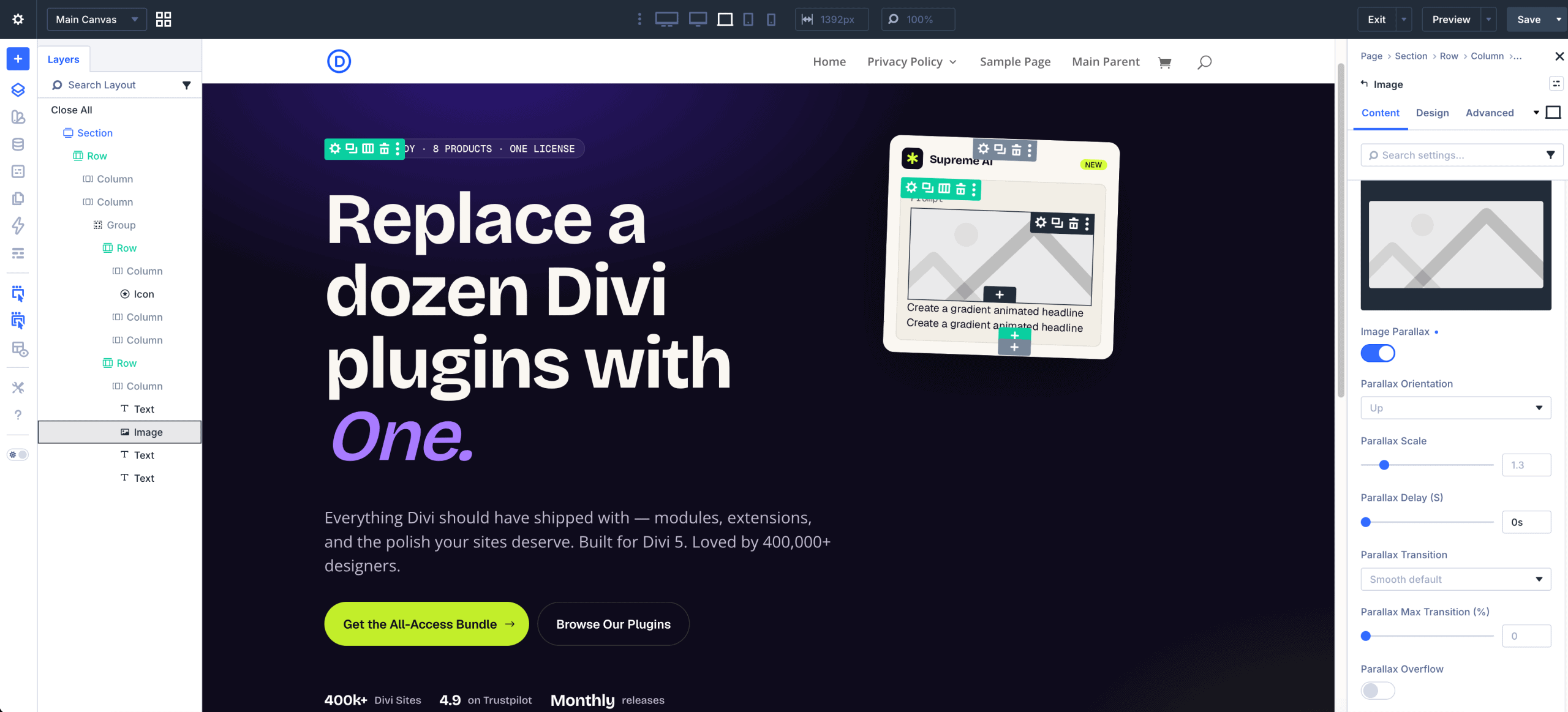
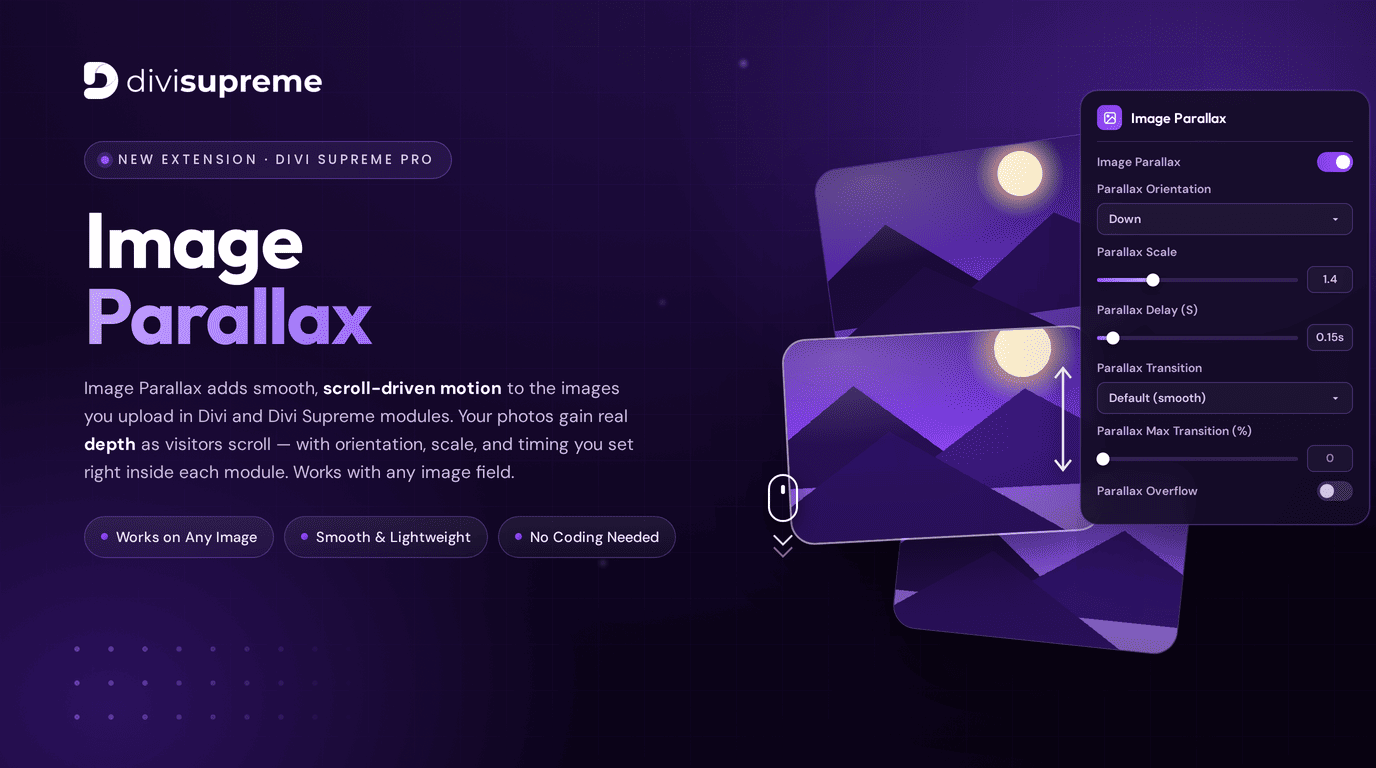
Image Parallax adds smooth, scroll-driven motion to the images you upload throughout your Divi site. As visitors scroll, your photos shift subtly within their containers — gaining real depth and a sense of three-dimensional space that makes your pages feel dynamic and alive.
It's the kind of effect you've seen on premium agency sites and high-end portfolios, where every image feels intentional and immersive. Now it's a simple toggle inside your Divi Builder, with full control over orientation, scale, and timing baked right into each module.
Three things make it special right out of the gate:
- Works on Any Image — apply it to virtually any image field across Divi and Divi Supreme modules.
- Smooth & Lightweight — buttery motion that won't weigh your pages down.
- No Coding Needed — every control lives right inside the module settings.
Real Image Tags — Not Just Backgrounds
Here's something we're especially proud of. Divi's built-in parallax only works on background images — images set in CSS behind your content. Image Parallax changes that. We've made the same smooth, scroll-driven motion work on real <img> tags: the actual images you upload into your Divi and Divi Supreme modules.
Why does that matter? It comes down to accessibility and SEO.
Real <img> tags keep their alt text right in your page's HTML. That means screen readers can describe them to visitors who rely on assistive technology, and search engines can read and index them as genuine page content. Background images, on the other hand, live in your CSS — and search engines typically don't treat them as page content at all, so they miss out on that accessibility and SEO value.
A Breakdown of Every Image Parallax Setting
We built Image Parallax to be effortless for beginners and precise for power users. Here's a full walkthrough of every option in the settings panel.
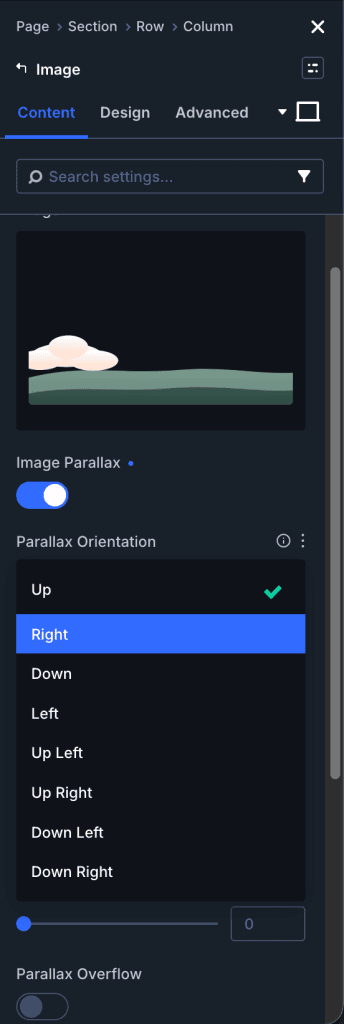
Image Parallax
The master switch. Flip this on for any image you want to bring to life, and the controls below come into play. Leave it off and your image behaves exactly as it always has.
Parallax Orientation
Sets the direction your image drifts as the page scrolls. Choose Down (the default) for a classic downward glide, or pick another orientation to send the motion in the direction that best suits your layout and composition.
Parallax Scale
Controls how much the image is scaled up to create room for the parallax movement. A value like the default 1.4 gives the image just enough headroom to shift gracefully without ever revealing an empty edge. Increase it for more dramatic, pronounced motion; keep it lower for something subtle and refined.
Parallax Delay (S)
Fine-tunes the timing of the effect, measured in seconds. The default of 0.15s adds a gentle, natural lag that makes the motion feel smooth and organic rather than rigidly locked to the scroll. It's a small detail that makes a big difference in how premium the effect feels.
Parallax Transition
Defines the easing curve of the movement. Stick with Default (smooth) for that silky, effortless glide, or select a different transition to change the character of the motion to match your design's personality.
Parallax Max Transition (%)
Lets you cap the maximum movement as a percentage, giving you precise control over exactly how far the image is allowed to travel. It's the perfect way to keep the effect tasteful and contained, especially in tighter layouts where you want just a hint of motion.
Parallax Overflow
Controls whether the image is allowed to extend beyond its container's bounds during the effect. Toggle it on when you want the motion to spill freely for a more expansive look, or leave it off to keep everything neatly clipped within the frame.
It Works With Any Image, Anywhere
Here's what makes Image Parallax so versatile: it isn't locked to a single module. Because it applies to any image field across Divi and Divi Supreme, you can bring depth to your hero backgrounds, feature images, galleries, blurbs, cards, and beyond — all from the same intuitive set of controls.
That means you can build a consistent, immersive scrolling experience across your entire site without juggling different tools or writing a line of custom code. Set your orientation, scale, and timing once you've found the look you love, and apply that same premium feel everywhere it matters.
Pair it with Divi's design tools and your other Divi Supreme effects, and you've got a deeply layered, interactive page that genuinely stands out — the kind of polish that used to require a developer and a pile of custom JavaScript.
Where to Find It
Image Parallax is available right now in Divi Supreme Pro 5.0.12. Simply update your plugin through your WordPress dashboard, open any module with an image, and look for the Image Parallax options in the settings panel.
If you're already running Divi Supreme Pro, the update is waiting for you — no extra steps required.
Ready to Add Some Depth?
Between Mouse Parallax and now Image Parallax, your Divi designs have never had more ways to feel alive. Image Parallax is fast, lightweight, works on any image, and adds that immersive, scroll-driven depth that visitors remember.
Update to Divi Supreme Pro 5.0.12 today, switch on Image Parallax, and watch your images come to life as your visitors scroll.
These are just a few of the many improvements — your feedback is making Divi Supreme Pro for Divi 5 stronger every day. If you spot something, report it here!
Ready to Upgrade?
Divi Supreme Pro 5.0 is available now for all active license holders. Simply update through your WordPress dashboard.
Stay tuned for more updates, and please don't hesitate to reach out if you have any questions or need assistance with anything related to Divi Supreme or Divi 5.
Best Regards,
Ken and the Divi Supreme Team
If you have an active or secured license for Divi Supreme plugins, rest assured it remains compatible with Divi 5. Due to ongoing development for Divi 5 compatibility, we will be adjusting our pricing.
How to access all Divi Supreme Modules
To access Divi Supreme Modules, you need to purchase the Pro version of our plugin. The Professional plan come with a 30% discount on renewals while we also offer you premium support and free updates during the licensing period.
Our goal is to assist you to create beautiful and effective business websites without impacting negatively on user experience.
So, give Divi Supreme Pro a try today, and don’t forget to share your experience with the Divi Supreme Plugins in the comments section below.
Or try out the Divi Supreme Lite
Divi Supreme Lite Offers 20+ Modules and 3 Beautiful Extensions and using them you can easily extend your site’s functionality.