Hello Divi enthusiasts, Ken from Divi Supreme!
You are building a landing page and you need a popup for the newsletter signup. So you save your work, jump over to Divi Library, build the layout, save that, jump back, and hope you remember which module needed to point at it. Do that three or four times a day and the popup itself starts to feel like the smallest part of the job.
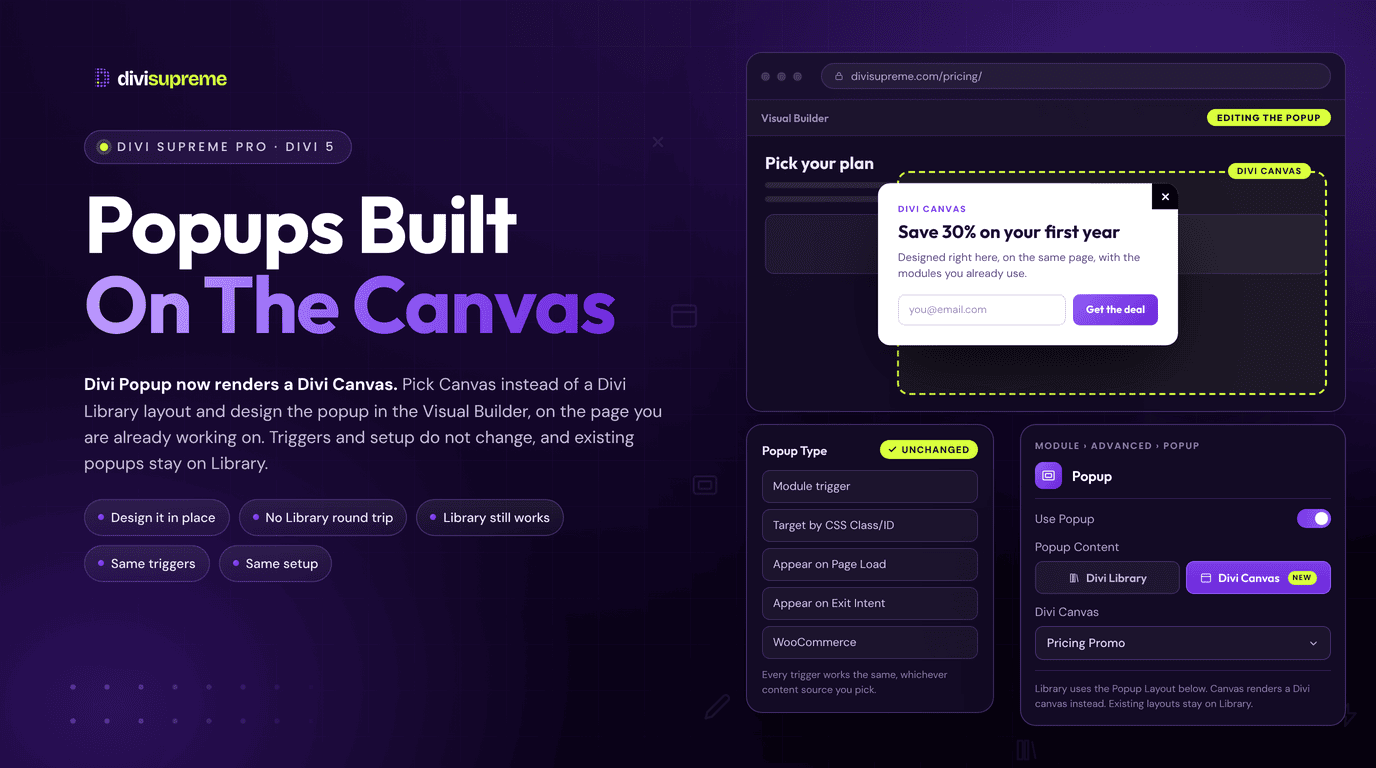
Divi Popup now has a second home for your popup content. It can render a Divi Canvas instead of a Divi Library layout, which means you can design the popup in the Visual Builder, on the same page you are already working on. The triggers and the way you set it up have not changed at all. Now available in Divi Supreme Pro 5.0.99.
What Is a Divi Canvas?
Every Divi 5 page starts with a Main Canvas, which holds your visible layout. Elegant Themes describes additional canvases as detached workspaces for things like slide-in menus, sidebars and modals, kept apart from your page content. A canvas can be local to one page, or global so you can reuse it across the whole site.
You reach them from the Canvas dropdown in the top bar of the builder. That is the whole point. The canvas is one click away from the page you are editing, so there is no second editor to open and no layout to track down afterwards.

Why It Beats Switching to Divi Library
Divi Library layouts work well, and they are not going anywhere. But a library layout lives outside the page. You build it in one place, preview it in another, and the popup you are designing never sits next to the content it belongs to.
With a canvas, the popup is part of the builder session. You can build it, check how it looks against the page behind it, and tweak it without a round trip. If you design with Divi 5 canvases already, your popup content now lives where the rest of your off-canvas content lives.
Nothing New to Learn
This was the one thing I wanted to protect. Every popup trigger you already know still works the same way, including module triggers, a CSS class or ID, page load, exit intent and the WooCommerce actions. Delays, close behaviour and open frequency are all in the same Popup Customiser as before.
The only difference is where the content comes from. If you build your popups with Divi Library layouts, they keep working exactly as they do today, and nothing you have already built changes or breaks.
Divi Library and Divi Canvas are both fully supported ways to power a popup, and the choice is yours. Library layouts suit popups you want to keep in your saved collection and reuse. Canvases suit popups you want to design on the page without leaving the builder. You can even use both on the same site, one popup at a time.
How to Use a Canvas as Your Popup
- Make sure Divi Popup is switched on under Divi Supreme Pro → Extensions.
- In the Visual Builder, open the Canvas dropdown in the top bar and add a global canvas. Build your popup content inside it.
- Open the Popup Customiser from the builder bar while that canvas is active, turn the popup on, and choose your trigger exactly as you would for a library layout.
- On the button or module that should open it, go to Advanced → Popup and switch on Use Popup.
- Set Popup Content to Divi Canvas, then pick your canvas from the list.
- Save the page. The popup settings are saved with the canvas.


Two details are worth knowing. Only global canvases that have the Popup Customiser turned on appear in the list, so a half-finished canvas will not clutter it. And if you leave the canvas selection empty, the popup renders no content, so pick one before you publish.
The docs cover every popup option in detail on the Divi Popup extension page.
What You Can Build With It
- Newsletter and lead popups can be designed beside the page, then opened on exit intent or after a delay. Pair one with a Contact Form Pro form and every submission lands in your entries.
- Offer and announcement popups are quick to edit when the content is one dropdown away, so a sale banner takes minutes to swap.
- Quick view popups open from any button and show extra detail without sending the visitor to another page.
- Social proof popups can hold a review wall from Supreme Testimonials for visitors who are nearly ready to buy.
Ready to Try It?
Update to the latest Divi Supreme Pro, add a global canvas and point a button at it. The first time you build a popup without leaving the page, the old library routine will feel like a lot of clicking for nothing. Version details are always on the changelog.
These are just a few of the many improvements. Your feedback is making Divi Supreme Pro for Divi 5 stronger every day. If you spot something, report it here!
Stay tuned for more updates, and please don’t hesitate to reach out if you have any questions or need assistance with anything related to Divi Supreme or Divi 5.
Best Regards,
Ken and the Divi Supreme Team