Hello Divi enthusiasts, Ken from Divi Supreme!
Divi’s built-in Contact Form is handy, until you need it to do a little more. It emails you a submission and… that’s about it. No saved record. Limited spam defence. And a fixed set of fields, so the moment you need a phone number with a country code, a file upload, or a signature, you’re stuck.
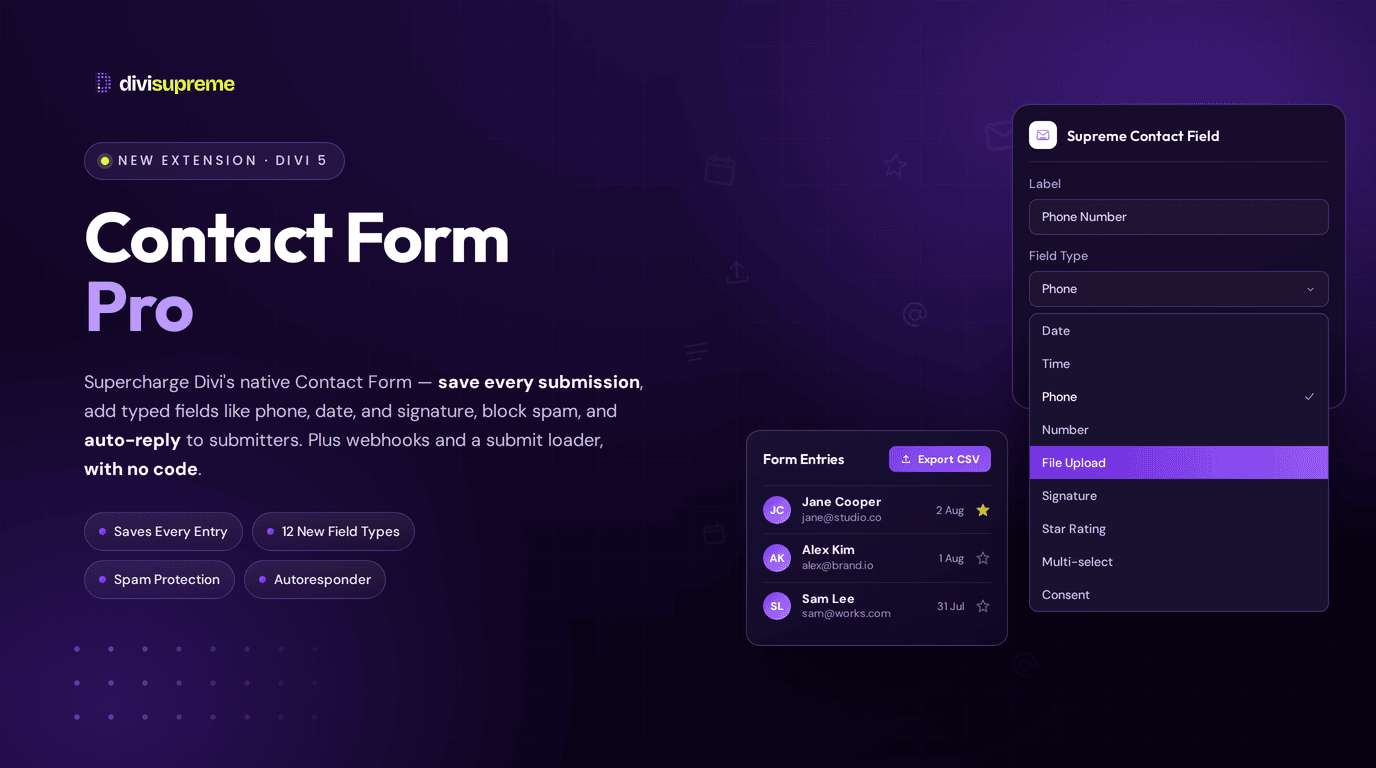
Our new Contact Form Pro Extension fixes all of that, without replacing the form you already know. It’s an opt-in extension that supercharges Divi’s native Contact Form: it saves your submissions, adds serious spam protection, and unlocks a whole set of new field types that slot right into the same form. Now available in Divi Supreme Pro 5.0.50.
What Is Contact Form Pro?
The key thing to understand: this works with Divi’s Contact Form, it doesn’t swap it out. You keep building forms exactly as you do today, using Divi’s own Field module for the standard stuff: Input, Email, Textarea, Checkbox, Radio, and Select. Contact Form Pro then layers three big upgrades on top:
- Saved submissions: every successful entry stored safely in your WordPress admin.
- Stronger spam protection: honeypot plus modern challenges, site-wide or per form.
- New field types: extras like phone, date, file upload, and signature that nest right inside the same form.
Site-wide settings live under Divi Supreme → Contact Form Pro, and per-form overrides appear on the Contact Form itself. (Worth being clear: this doesn’t replace Contact Form 7 or Divi’s built-in captcha options. It’s a focused upgrade to Divi’s own form.)
Never Lose a Submission Again
This alone is worth the price of admission. Divi’s native form only emails you, so if that email lands in spam, bounces, or you simply delete it by accident, that lead is gone for good.
Contact Form Pro stores every successful submission in your dashboard under Divi Supreme → Form Entries. From there you can filter entries, star the important ones, and export to CSV whenever you need. Your leads finally live somewhere reliable instead of vanishing into an inbox.

Powerful New Field Types
Here’s the flexible part. Keep using Divi’s Field module for the basics, and add a Supreme Contact Field only where you need something extra. The two live side by side in the same form. Here’s what you unlock:
- Date, Time, and Date & Time: collect a calendar date, a time of day, or both together. Perfect for bookings and appointment requests.
- Phone: a proper phone input with an optional country code and a searchable default country, so international enquiries are painless.
- Number: numeric input with optional minimum and maximum values.
- URL: a tidy input for website or link fields.
- Multi-select Dropdown: a closed dropdown that opens into a checkbox list, with sortable value/label options.
- Star Rating: interactive 5- or 10-star ratings you can style in the Design tab. Great for feedback.
- Signature: a draw-to-sign pad with a clear button, ideal for agreements and consent.
- Hidden: an invisible field with a default value, handy for tracking the source of a submission.
- Acceptance / Consent: a consent checkbox with rich consent text (links included), for GDPR and terms acceptance.
- File Upload: a clean dropzone with site-level controls for maximum size and allowed file types.

Stronger Spam Protection
Divi’s native form leaves you fairly exposed to spam. Contact Form Pro closes that gap with layered defences you can set site-wide or per form:
- Honeypot: an invisible trap that catches bots without bothering real visitors.
- Cloudflare Turnstile and hCaptcha: modern, privacy-friendly challenges when you want an extra layer.
And it handles spam intelligently. A failed challenge or a filled honeypot gets stored as Spam, the Divi admin email is blocked, and the bot doesn’t see your normal success message, so your inbox stays clean and your entries stay trustworthy. There’s also a blacklist that quietly routes matching submissions to Spam for review. (One tip: stick to a single interactive challenge per form for the smoothest experience.)

A Polished Submit Experience
Small touch, nice payoff: an optional Submit loader shows during the AJAX submit and any file pre-upload, so visitors get clear feedback that their message is on its way instead of wondering whether the button worked.
Email, Autoresponder, and Integrations
Contact Form Pro plays nicely with the rest of your workflow:
- Admin notifications: your Supreme fields are included in Divi’s admin notification email when it sends, so you see the full submission.
- Autoresponder: automatically reply to the person who submitted, confirming you got their message.
- Webhooks: push submission data to other services, so you can wire your form into a CRM, automation tool, or wherever your leads need to go.
- GDPR retention: control how long entries are kept, so you stay compliant.
Real Use Cases
- Job applications. Combine File Upload (for CVs), Phone, and a Consent checkbox, then review and export every applicant from Form Entries.
- Bookings and appointments. Use Date & Time plus Phone so clients request a slot in seconds. If a field always causes confusion, Page Tour can explain it in place.
- Feedback forms. Drop in a Star Rating, then filter and export the results to spot trends.
- Signed agreements. Pair the Signature pad with a Consent field for lightweight sign-offs.
- Protected lead gen. Turn on Turnstile or hCaptcha, fire submissions to your CRM via Webhooks, and auto-reply with the Autoresponder. Put the form behind Password Protection when the content on the other side is worth gating.
How to Enable It
- Go to Divi Supreme → General, switch on the Contact Form Pro extension, and save.
- Configure site-wide options under Divi Supreme → Contact Form Pro, and fine-tune per form using Supreme Spam Protection and Supreme Submit Loader on the Contact Form.
- In the builder, keep using Divi’s Field module for standard fields and add a Supreme Contact Field wherever you need one of the new types.
The docs cover the entries screen and every field option in detail: Contact Form Pro extension and the Supreme Contact Field module.

Why It’s Worth Using
If you rely on your contact form to bring in work (and most of us do), this turns a basic form into a proper lead-capture system. You stop losing submissions, you keep the spam out, you collect exactly the information you need with the right field types, and you can route it all wherever it needs to go. Best of all, it builds on the Divi form you already know, so there’s almost no learning curve. And it’s already included in Divi Supreme Pro.
Ready to Upgrade Your Forms?
Update to the latest Divi Supreme Pro, switch on Contact Form Pro, and give your Divi contact forms the entries, spam protection, and field types they’ve always been missing.
These are just a few of the many improvements. Your feedback is making Divi Supreme Pro for Divi 5 stronger every day. If you spot something, report it here!
Stay tuned for more updates, and please don’t hesitate to reach out if you have any questions or need assistance with anything related to Divi Supreme or Divi 5.
Best Regards,
Ken and the Divi Supreme Team